DEWA, du, Netflix, Salik, the gym, rent. Dues puts them on one 30-day timeline, warns you before the money leaves, and shows what you keep after payday — with everything stored on your phone, not on a server.
Free for up to 8 bills. Dues Pro from AED 9.99/month, 7-day free trial. No account, no bank login.
Tap the ones you pay. Amounts are typical for Dubai; the app uses yours.
Four steps, in the order they actually happen.
Pick from the presets for your region or type a name and an amount. Dues sets the category, the cadence — monthly, quarterly, yearly or every N weeks — and a reminder.
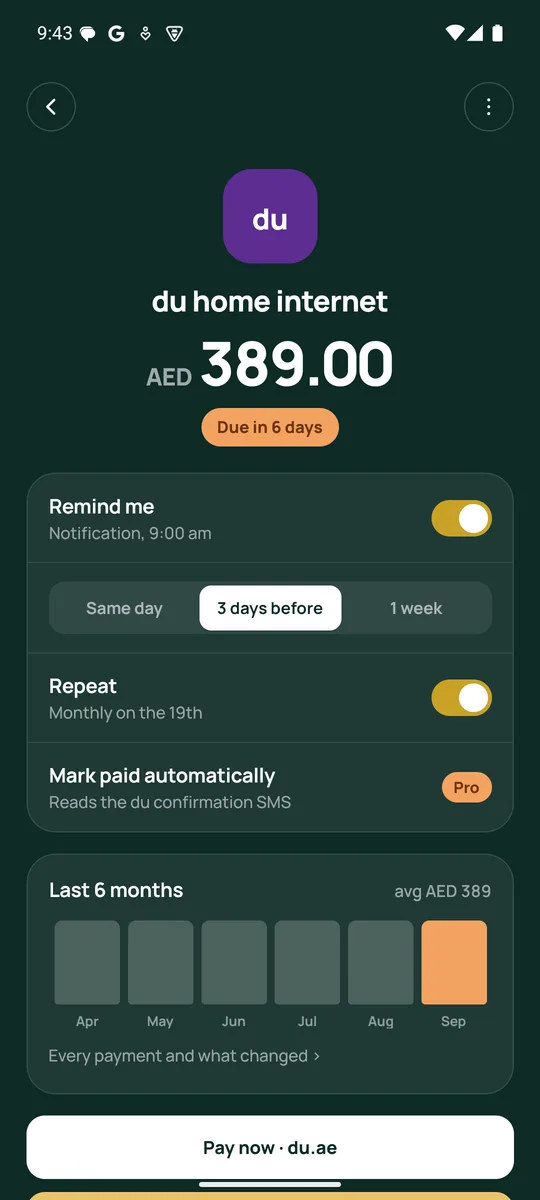
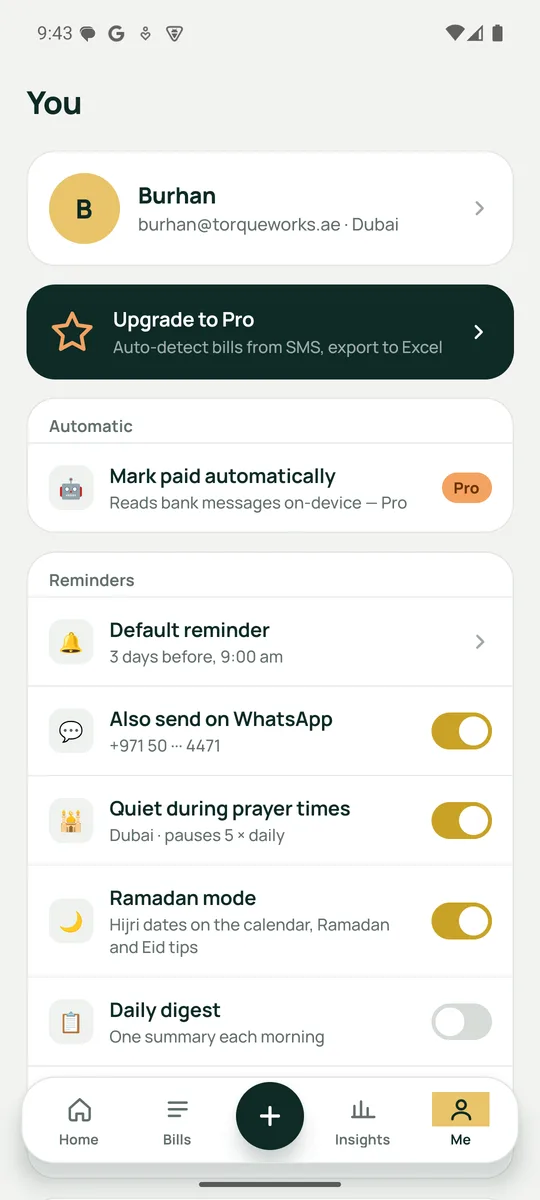
Three days before, at 9 am, by default. Change it per bill. Dues can hold a reminder until prayer time has passed.
Pay now opens the biller's app if you have it, their website if not, or a link you saved. Come back and Dues asks whether to mark it paid.
One tap from the notification. With Pro on Android, the bank's own confirmation marks it paid for you.
No streaks, no nagging, no bank login. The things that matter when a bill is a bill.
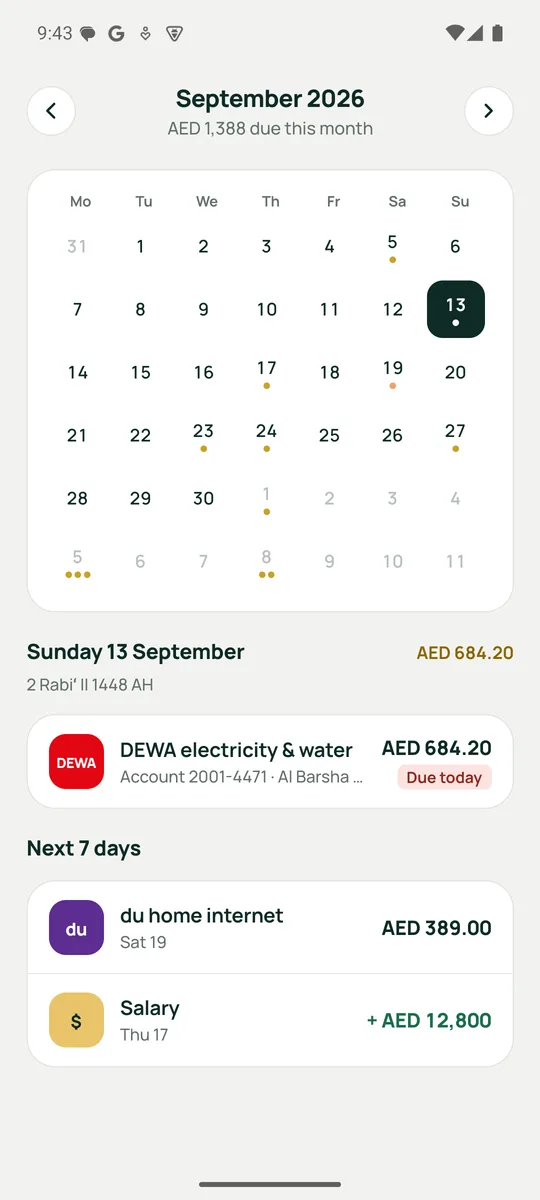
See what leaves your account this week and this month, bubble-sized by amount. Tap any day to open the calendar.
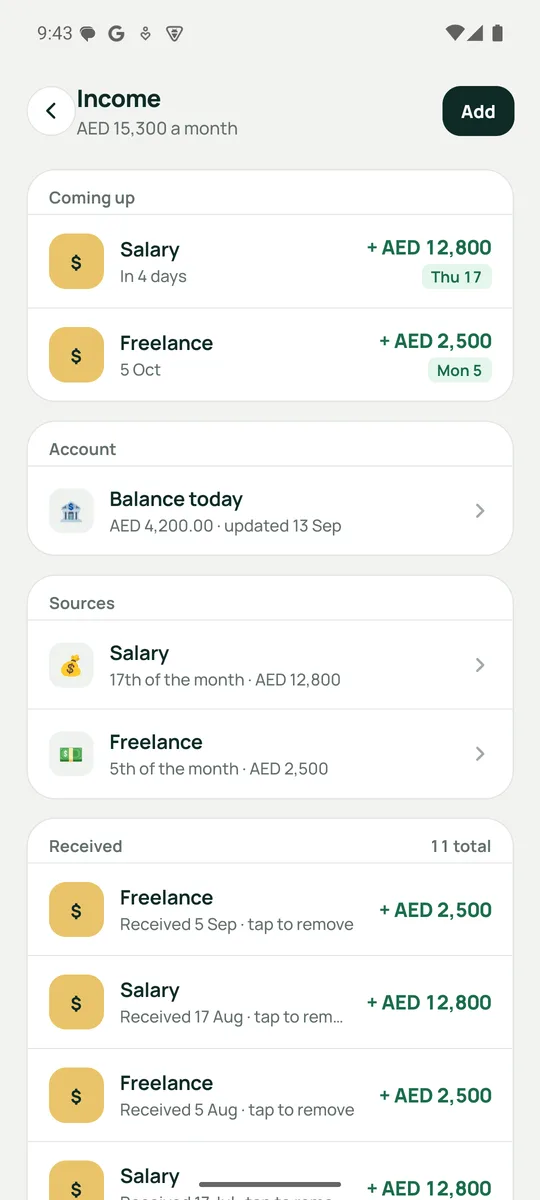
Salary, freelance, rent from a tenant, a one-off bonus. Tap when it lands and it feeds your balance, the money-in chart and the export.
Type in today's balance once. Dues runs it forward to payday — bills out, income in — and warns if it runs short.
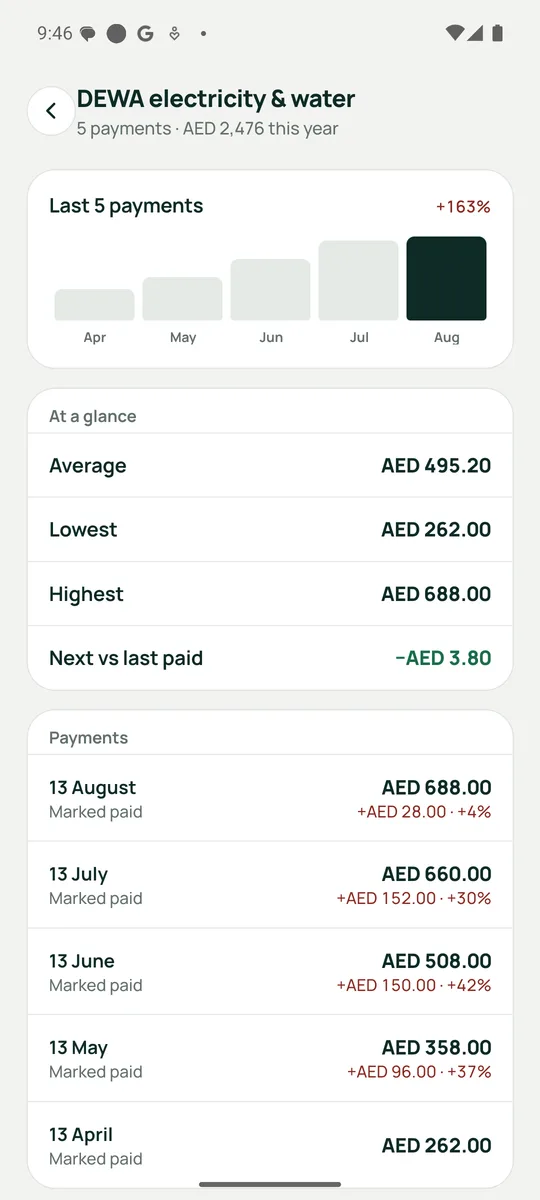
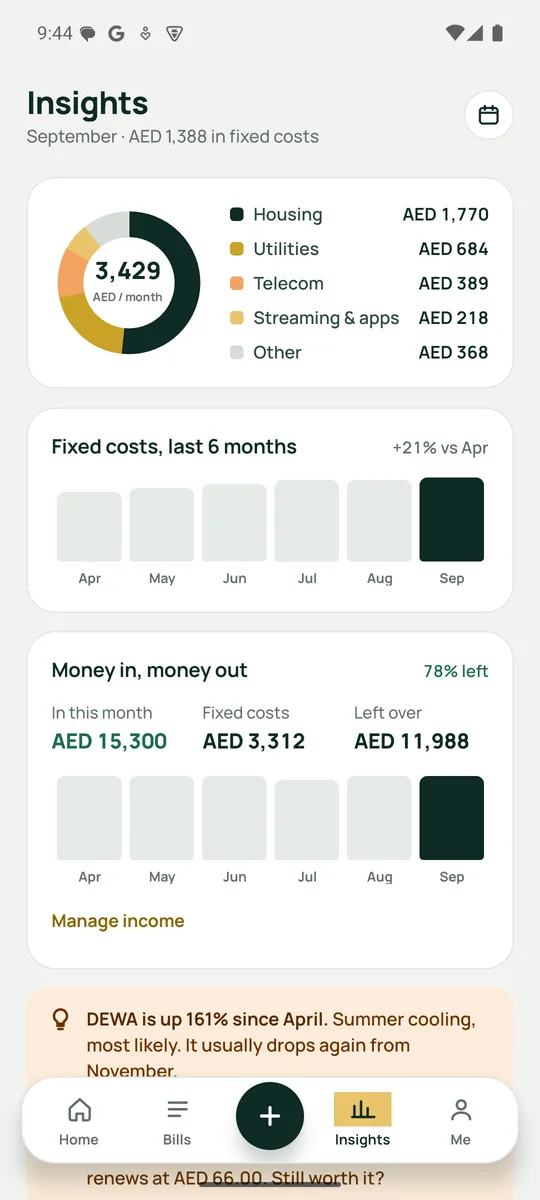
Fixed costs by category, money in vs out, the last six months, and plain-English tips: DEWA up 161% in summer, Netflix up AED 10.
Every payment of a bill with what changed each time — and the next amount against the last one, so a rise shows before it's paid.
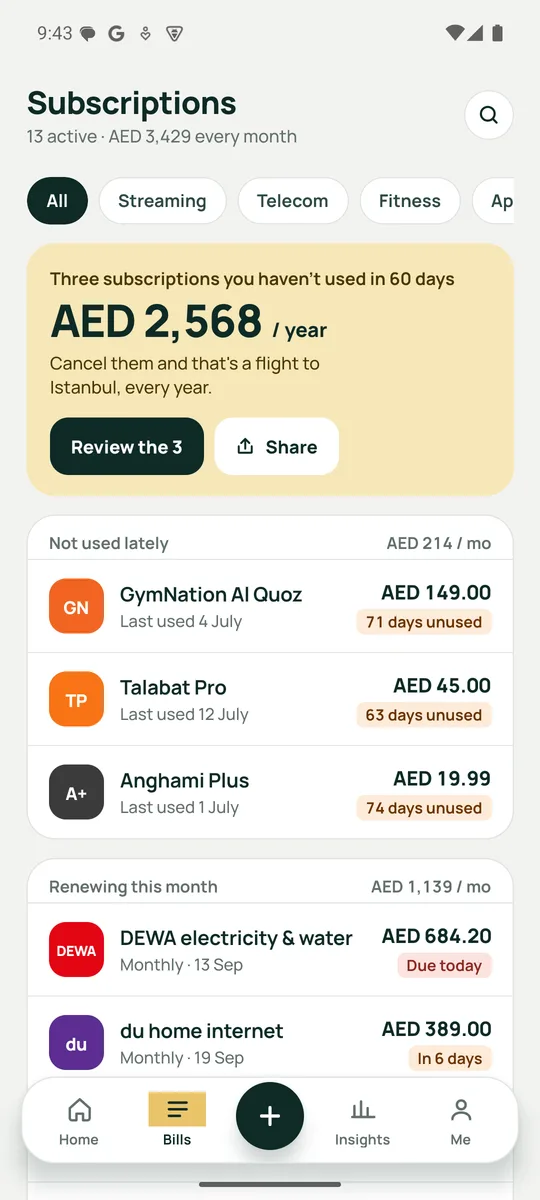
Anything you haven't opened in 60 days gets flagged, with what it costs a year. Share the card with whoever keeps telling you to cancel.
Weekly, monthly, quarterly, half-yearly, yearly — or every 4 months for the rent cheque, every 3 weeks for the water delivery.
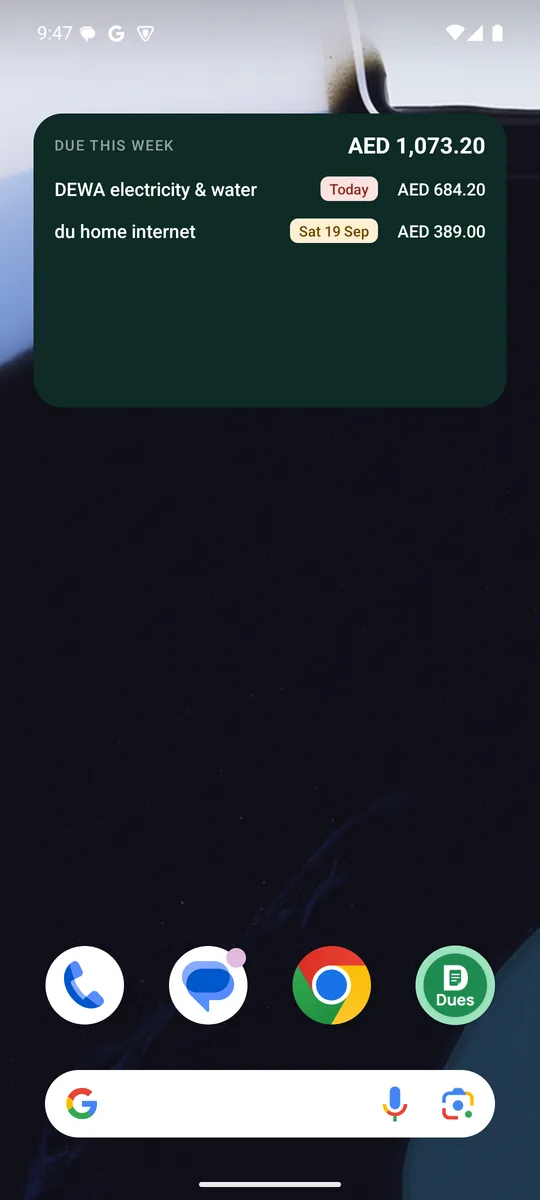
This week's bills and the 7-day total on your home screen. Rows stay right after midnight, and tap one to open the bill. Android.
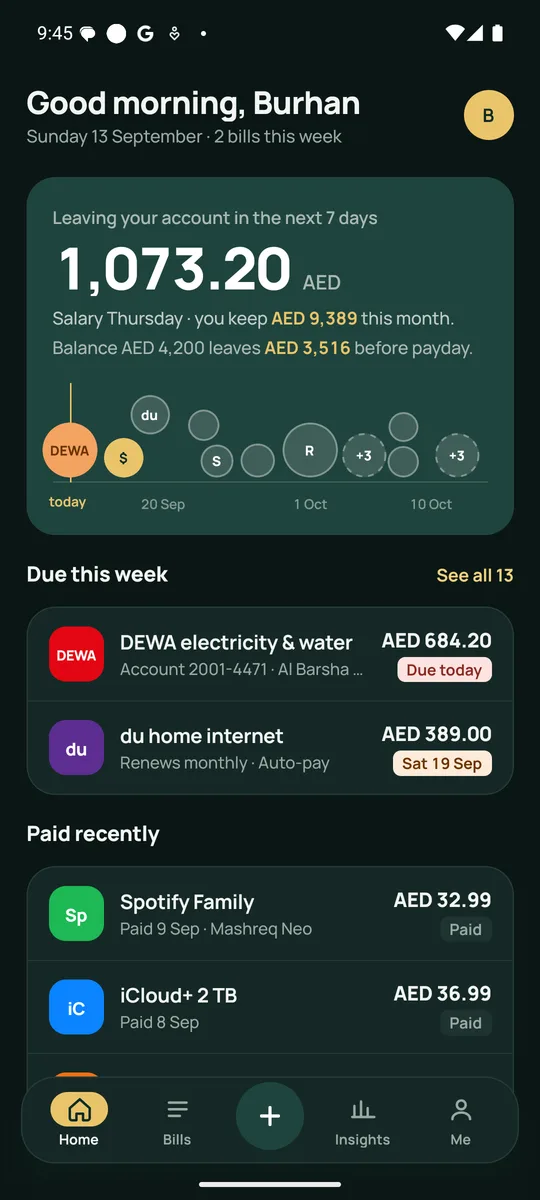
Follows your phone, or set it yourself. Every screen, every chart — the bill detail and lock screen keep the dark green in both.
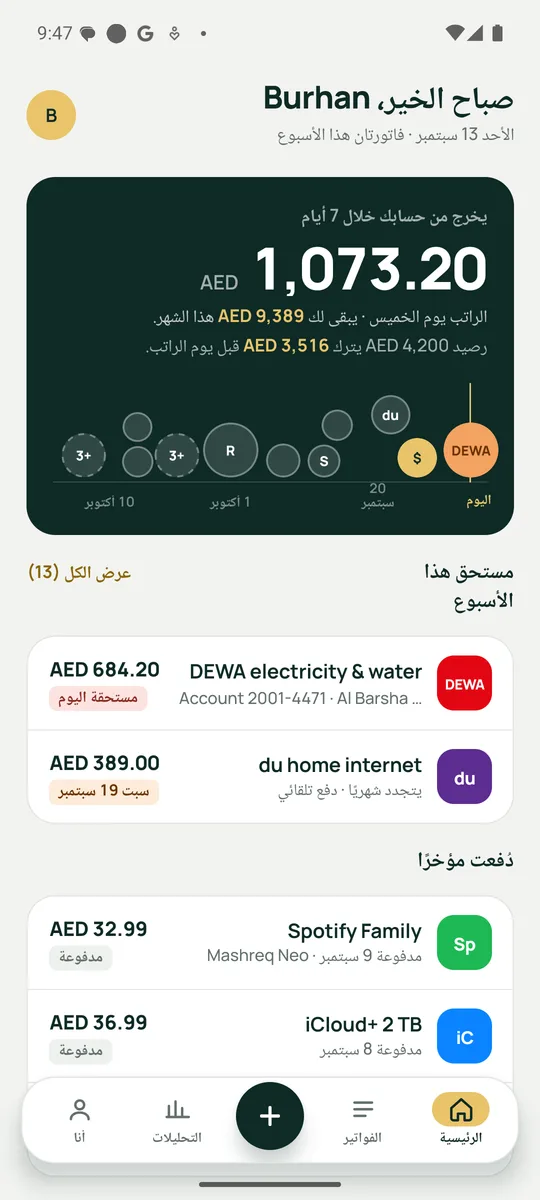
The whole app in Arabic with a mirrored layout, Arabic month names and Hijri dates. Switch under Me → Language, or let the phone decide.
Prayer-time aware reminders, Hijri dates and Eid tips in Ramadan mode, 20 currencies, and five regional packs of billers and banks.
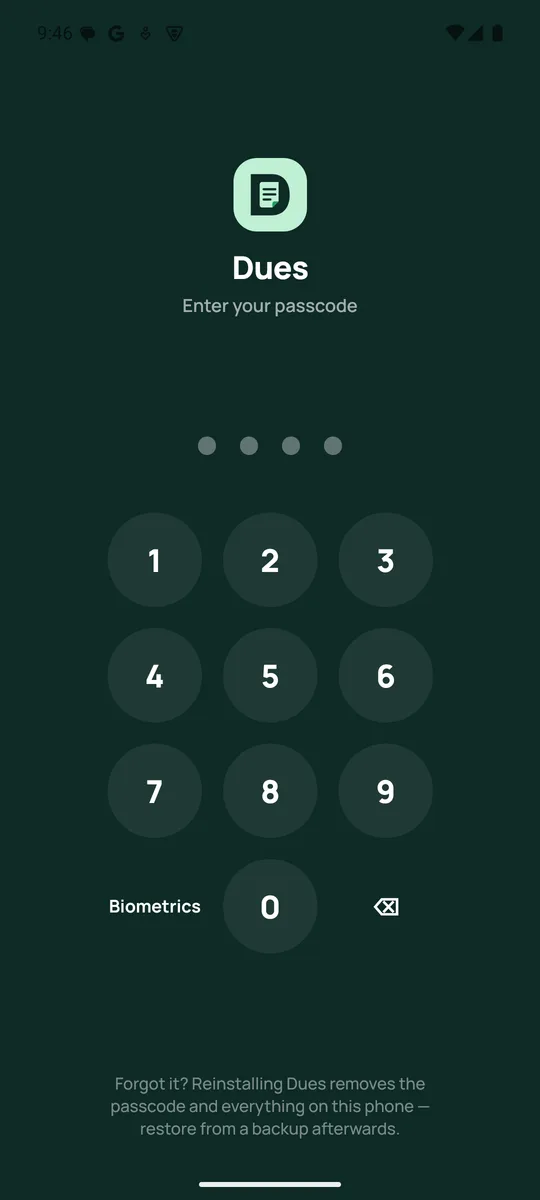
A passcode plus Face ID, Touch ID or fingerprint. Your database rides along in your Google or iCloud backup, and you can export a file any time.
Dues moves fast. Everything below is in the current release.
Every screen, chip, tip and notification in Arabic. The layout flips, dates use Arabic month names, amounts keep the currency code and Western digits. A phone set to Arabic just opens in Arabic.
Your bills, payments and settings are now in the phone's own cloud backup and come back when you sign in on a new phone. Me → Backup explains it and keeps the file backup for moving between platforms.
The last 12 payments as a chart with the trend, average, lowest, highest, and “next vs last paid”.
One button on the bill: your own payment link, the biller's app, or the biller's site. Return within 15 minutes and Dues asks “Paid?”.
System, light or dark. Every colour pair checked for contrast in both.
Android widget with this week's bills and the total; resizable from one line to four.
Plus “every N weeks / months” for the things that don't fit a calendar month.
Mark salary and other income received; see money in vs money out on Insights.
Saudi Arabia, Qatar, India and Pakistan join the UAE, each with its own billers, banks, prayer-time method and weekend.
Turn on Mark paid automatically and the confirmation your bank app posts becomes a paid bill — read on your phone, never uploaded.
Works with Emirates NBD, ADCB, Mashreq, FAB, DEWA, du and e& in the UAE, and with the bank-message formats of each regional pack. A merchant that shows up two months running becomes a suggestion: “Looks like a subscription — add it?” On iPhone, paste the message and Dues reads it the same way.
Add the widget once from Me → Reminders. It shows what is due in the next seven days with the total, relabels “Today” and “Tomorrow” by itself overnight, and updates the moment you mark something paid. Tap a row to open that bill; resize it from one line to four.
iOS widget arrives with the iPhone release.
Every screen has a dark palette — cards, charts, chips, sheets, the paywall. Bill detail, onboarding and the lock screen keep the deep green in both, so they still read as their own place. Pick System, Light or Dark under Me → Appearance.
The whole app — tabs, bills, tips, reminders, the widget — in Arabic, with the layout flipped right-to-left, Arabic month and weekday names, Hijri dates and proper plurals (فاتورة، فاتورتان، فواتير). Amounts keep the ISO currency code and Western digits, the way banking apps here do.
A phone already set to Arabic opens Dues in Arabic. Otherwise Me → Language.
Type in today's balance once. Dues runs it forward to your next salary — bills out, other income in — and shows the lowest point along the way. Tap an upcoming payday when the money lands; marking a bill paid keeps the number honest.
Salary, freelance, rent from a tenant, a one-off bonus: every source lands on the timeline, the calendar and the money-in chart.
Where the fixed costs go, how this month compares with the last six, and which bill moved: “DEWA is up 161% since April — summer cooling, most likely.” Open any bill for its last twelve payments, the trend, and the next amount against the last one paid — Netflix's AED 10 rise shows before it lands.
The gym you haven't visited in 71 days gets its own line, with the yearly cost of keeping it.
Each region brings its own billers, bank-message formats, prayer-time method, weekend and default currency. Switch any time under Me → Currency & region; your bills stay as they are.
DEWA, SEWA, Etihad WE, ADDC · du, e&, Virgin · Salik, Darb, nol · Emirates NBD, ADCB, Mashreq, FAB
AEDSEC, NWC · stc, Mobily, Zain · HungerStation, Jahez · Al Rajhi, SNB, Riyad, Alinma, stc pay
SARKahramaa · Ooredoo, Vodafone · Snoonu, Karwa · QNB, CBQ, Doha Bank, QIB
QARElectricity, gas, water · Jio, Airtel, Vi, BSNL · EMI, LIC, FASTag · HDFC, ICICI, SBI, Axis, GPay, PhonePe, Paytm
INRDISCOs, SSGC, SNGPL · Jazz, Zong, Telenor, Ufone, PTCL · committee · HBL, Meezan, UBL, MCB, JazzCash, easypaisa
PKRAdd any bill by hand, pick from 20 currencies, and add your own categories — Pets, Charity, Maid, School fees.
20 currencies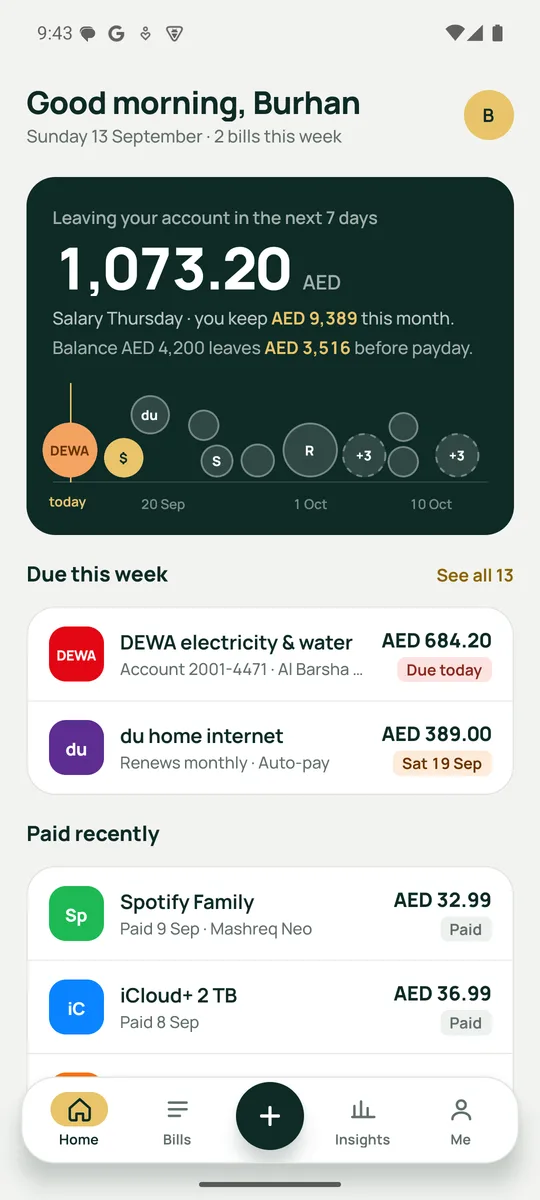
One cancelled subscription covers a year of Pro.
AED 0
AED 9.99 / month
or AED 79.99 / year — save 33%
Billed through the App Store or Google Play. Cancel anytime; nothing is charged during the trial.
Dues has no account and no server. Your bills live in a local database that is part of your phone's own Google or iCloud backup, and you can export a backup file any time. The app-lock passcode never leaves the phone's keychain. Analytics are anonymous and never include amounts, names or account numbers.
Read the privacy policyNo. There is no bank login and no open-banking link. You add bills yourself (most take one tap from the preset list), and optionally let the Android app read payment confirmations from your bank app's notifications on the device.
For automatic mark-paid in the UAE: Emirates NBD, ADCB, Mashreq, FAB, DEWA, du and e&. The Saudi, Qatari, Indian and Pakistani packs carry their own banks and message formats. New formats are added as they are reported — email hello@apexvisionerp.com with a redacted example.
It opens the fastest official way to pay: a payment link you saved on the bill, otherwise the biller's app if it is installed, otherwise the biller's website. Dues never takes a payment itself. When you come back within a few minutes it asks whether to mark the bill paid — it never assumes.
The app hands the widget a snapshot every time your bills change and every time you open it. The widget itself recomputes “Today” and “Tomorrow” from the dates, so it still reads right the morning after. Tap a row to open that bill. Android only for now.
Yes. Choose العربية under Me → Language, or leave it on System and a phone set to Arabic opens Dues in Arabic. The layout flips right-to-left, dates use Arabic names, and amounts keep the currency code and Western digits.
Apple does not allow apps to read SMS or other apps' notifications. On iPhone you paste a confirmation message into Dues and it is processed the same way, on the device. The home-screen widget arrives with the iPhone release.
Yes — the local database is part of your normal Google or iCloud backup and comes back when you sign in on a new phone. You can also export a JSON backup from Me → Backup and restore it on another phone, including across Android and iPhone. The app-lock passcode is never backed up; set it again after a restore.
Yes: weekly, monthly, quarterly, half-yearly, yearly, or a custom “every N weeks / months”. Month-based bills keep their day of the month, so a bill on the 31st lands on the 30th or 28th when it must and comes back to the 31st.
Yes. Add any bill manually and pick from 20 currencies. Changing the currency relabels your amounts; it never converts them. More regional packs arrive as they are asked for.
The passcode lives only in your phone's secure keychain, so it cannot be reset remotely. Reinstalling Dues clears it along with your data — restore from a backup afterwards.
 Dues
Dues